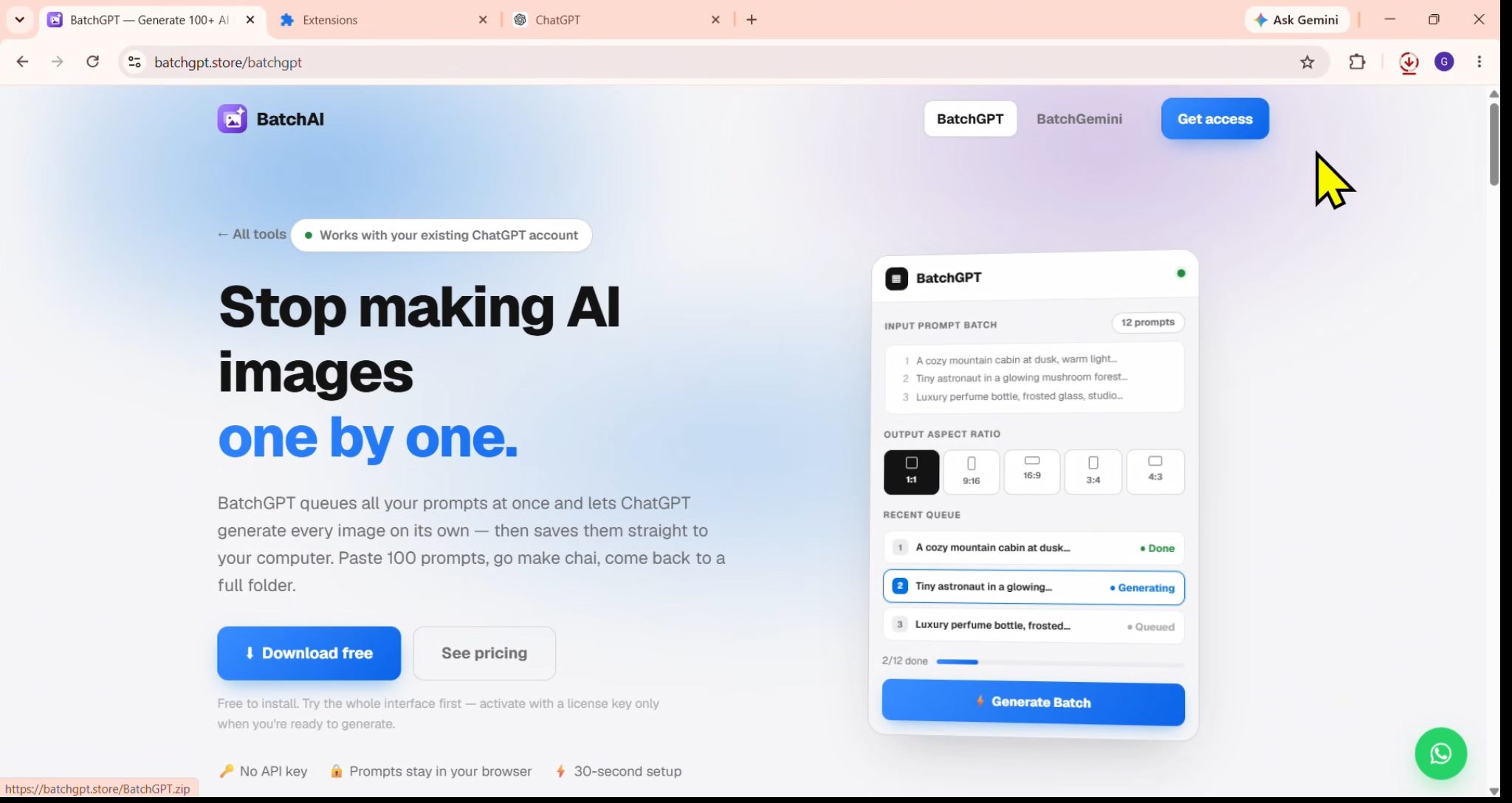
Works with your existing ChatGPT account

Stop making AI images
one by one.

BatchGPT queues all your prompts at once and lets ChatGPT generate every image on its own — then saves them straight to your computer. Paste 100 prompts, go make chai, come back to a full folder.

Free to install. Try the whole interface first — activate with a license key only when you're ready to generate.

  • 🔑 No API key
  • 🔒 Prompts stay in your browser
  • ⚡ 30-second setup

Doing it by hand costs you the whole evening

😮‍💨 Without BatchGPT
  • Type a prompt. Wait. Save. Repeat.
  • Set the aspect ratio again every time
  • Right-click → Save as… on every image
  • Lose your place after 20 prompts
  • 2–3 hours for 50 images
⚡ With BatchGPT
  • Paste all your prompts once
  • Pick the ratio once — applied to all
  • Every image downloads automatically
  • Live queue shows exactly where it is
  • You do nothing while it runs

Three steps. That's the whole thing.

1

Paste your prompts

One per line — or import a .txt / spreadsheet. Fifty, a hundred, doesn't matter.

2

Pick a ratio, hit Generate

Square, portrait, widescreen — chosen once and applied to every prompt in the batch.

3

Walk away

BatchGPT works through the queue and saves each finished image into one folder.

Everything you need for bulk work

📋

Unlimited prompt queue

Paste as many prompts as you want. BatchGPT works through them one at a time, in order.

📐

5 aspect ratios

1:1, 9:16, 16:9, 3:4, 4:3 — set once, applied to the entire batch automatically.

⬇️

Auto-download

Every finished image lands in one folder with a timestamped, prompt-based filename.

🖼️

Reference images

Attach up to 8 reference images so the whole batch follows your style.

📊

Import from spreadsheet

Already have prompts in Excel or Google Sheets? Import the CSV and go.

🔁

Auto-retry

If one prompt fails, it retries — and the rest of the queue keeps running regardless.

🔒

Your prompts stay private

Prompts and images never touch our servers. Everything happens inside your own browser.

💻

All your browsers

One license covers Chrome, Edge, Brave and every Chrome profile on the same computer.

💬

WhatsApp support

Stuck? Message us directly. A real person replies — no ticket queue.

Set up in 30 seconds

No account, no API key, no configuration. Install it, and the whole interface is yours to explore before you pay for anything.

  1. 1

    Download & unzip

    Put the folder somewhere permanent — like C:\Tools\BatchGPT. Chrome loads it from that exact path, so don't delete or move it afterwards.

    ⬇ Download BatchGPT
  2. 2

    Open Chrome extensions

    Go to chrome://extensions and turn on Developer mode using the toggle in the top-right corner.

  3. 3

    Load unpacked

    Click Load unpacked (top-left) and pick the folder you unzipped — the one that directly contains manifest.json. Then pin BatchGPT to your toolbar.

  4. 4

    Open ChatGPT and activate

    Go to chatgpt.com, click the BatchGPT icon, and the side panel opens. Paste your license key, hit Activate, and you're generating.

Simple pricing

One license = one computer. Pay once, no hidden charges.

1 Month
PKR 1,499 / $5
Try it on a real project
  • ✓ All features unlocked
  • ✓ Unlimited images
  • ✓ Works on 1 computer
  • ✓ WhatsApp support
Get access
Most popular
3 Months
PKR 2,999 / $12
Save PKR 1,498 vs monthly
  • ✓ Everything in 1 Month
  • ✓ 3 months of updates
  • ✓ Switch computers anytime
  • ✓ Priority WhatsApp support
Get access
Lifetime
PKR 9,999 / $35
Pay once, keep it forever
  • ✓ Everything in 3 Months
  • ✓ Never expires
  • ✓ All future updates free
  • ✓ Priority WhatsApp support
Get access

Pay via JazzCash, Easypaisa or bank transfer. Message us on WhatsApp and you'll get your license key right away.

Questions

Do I need a ChatGPT Plus subscription?

Yes. BatchGPT drives image generation inside your own ChatGPT account, so you need an account that can generate images. It is not a replacement for ChatGPT — it automates the clicking for you.

Do I need an API key?

No. There is nothing to configure and no per-image cost from us. Install the extension, paste your license key, and it works with the ChatGPT you already use.

Can I use it on more than one computer?

One license runs on one computer at a time. All your browsers and Chrome profiles on that computer share the same license. If you switch machines, press Reset device in Settings and activate on the new one.

Do you see my prompts or my images?

No. Prompts and generated images stay inside your browser and are never sent to us. Our server only checks whether your license key is valid and counts how many images were made — never what they were.

How many images can I generate?

As many as your ChatGPT account allows. BatchGPT adds no limit of its own — though ChatGPT's own rate limits still apply, so there is an adjustable delay between prompts.

Which browsers work?

Any Chromium browser with side-panel support — Chrome, Edge, Brave and Arc. Firefox and Safari are not supported.

What if it stops working?

ChatGPT occasionally changes its page layout, which can break automation. When that happens we ship an update. Message us on WhatsApp and we'll sort it out.

Your next 100 images could make themselves.

Message us on WhatsApp — you'll have your license key in minutes.

💬 Message on WhatsApp
⬇ Download Get a license